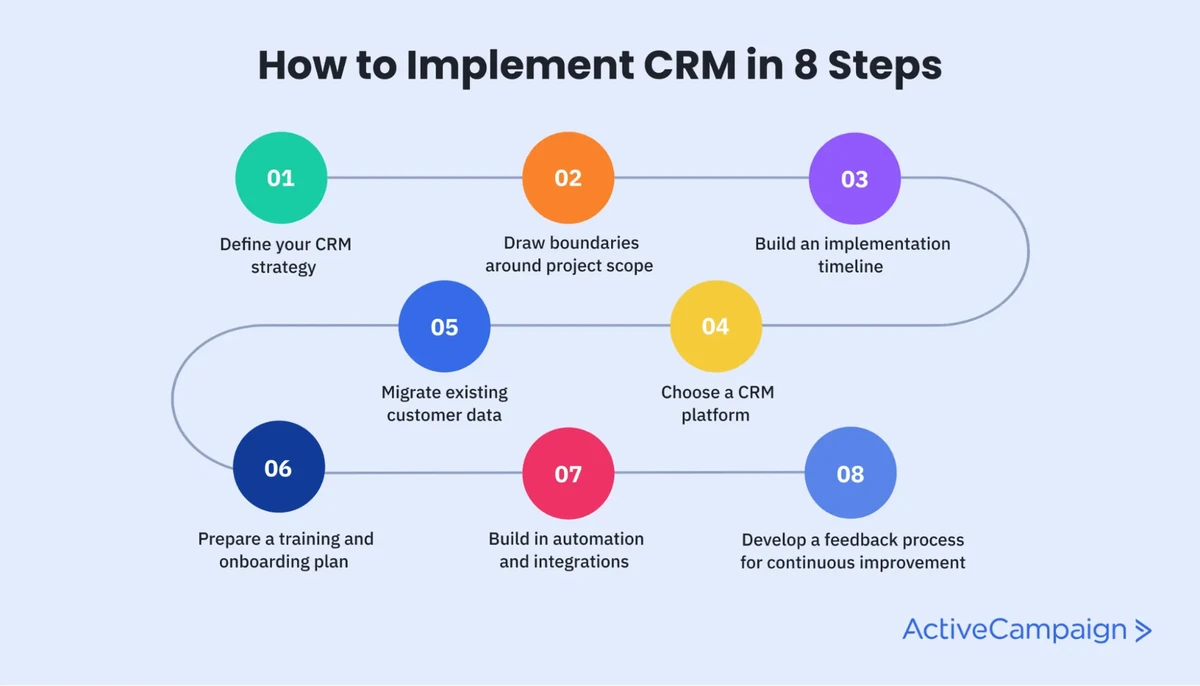
A successful CRM implementation transitions sales, marketing, and service teams onto a centralized platform without operational disruption, data loss, or adoption friction. This guide outlines the end-to-end deployment process for mid-market and enterprise organizations, covering stakeholder discovery, data architecture, phased migration, and pilot validation. According to benchmark research published by HubSpot, “Companies using CRM systems to track leads and manage their pipeline see a 29% increase in lead conversion rates.” Capturing that performance gain requires disciplined technical sequencing rather than treating software deployment as a passive administrative handoff. Analysis by Gartner reveals that 70% to 80% of CRM investments now flow into SaaS solutions within an enterprise software market exceeding 163 bn, yet deployments frequently stall when organizations cut over without structured sandbox validation or cross-functional alignment.
Establish Project Scope and Define Measurable Targets
To implement a CRM successfully, assemble a cross-departmental team across sales, marketing, service, and finance, then define measurable SMART targets—such as shortening the average sales cycle by 20% within six months. Mid-market teams (15–100 users) should plan for 8 to 12 weeks, while enterprise rollouts require 3 to 6 months.
CRM author Patricia Jones points out that while organizations invest heavily in relationship management platforms, execution failures consistently minimize bottom-line returns. A frequent failure point occurs when project managers restrict scoping discovery to a single departmental head. The vice president of sales prioritizes pipeline stages, deal velocity, and activity logging, whereas the marketing director focuses on attribution modeling and lead scoring. Simultaneously, customer support managers require ticket escalation workflows, and the finance team demands clean invoice matching and revenue recognition schedules. Capturing every perspective during discovery establishes a four-tier requirements framework covering functional needs, relational data models, user interface views, and technical integration parameters.
Teams must anchor configurations to specific operational metrics using the SMART goal framework. Rather than setting vague aspirations to improve communication, project charters should target tangible efficiency gains, such as reducing the average sales cycle duration by 20% within 6 months of live deployment. Project managers must also calculate total cost of ownership factors that extend past base seat licenses. These budget considerations include API call tier limits, secondary sandbox charges, middleware connector fees, and long-term storage consumption tiers.
Scoping parameters, resource allocations, and rollout pacing diverge significantly depending on organizational size and existing technical debt. The table below outlines standard operational baselines for mid-market and enterprise CRM initiatives.
Implementation Scope |
User Count |
Typical Timeline |
Integration Complexity |
Rollout Methodology |
|---|---|---|---|---|
Mid-Market Deployment |
15–100 users |
8 to 12 weeks |
2 to 3 integrations |
Phased department rollout with sandbox testing |
Enterprise Deployment |
100+ users |
3 to 6 months |
Complex multi-business unit workflows and custom APIs |
Multi-stage regional or business unit pilot run |
Mid-market projects usually center on synchronizing corporate email and standard accounting software, whereas enterprise programs must coordinate asynchronous event brokers, multi-subsidiary billing engines, and regional data privacy boundaries.
Cleanse Legacy Data and Enforce Property Discipline
Extracting unvalidated records from a legacy database guarantees reporting errors, broken automation triggers, and user distrust on launch day. Data engineers must run deduplication algorithms, resolve missing records, and standardize naming, address, and international phone conventions prior to running any target ingestion scripts. Scrubbing data inside the legacy system or an intermediate staging table prevents bad data from corrupting the new production schema.
Warning: Creating custom fields without strict operational necessity creates permanent architectural debt. You can always add properties later, but removing them after data has been collected across live pipelines is painful and risks breaking reporting dependencies.
Field mapping and normalization require reconciling legacy source tables against target standard and custom objects. Data leads must map picklists, harmonize disparate date-time formats, and enforce strict transformation logic for compound objects like parent accounts with multiple physical operating locations. Every custom property must serve a documented operational KPI, support an automated workflow trigger, or fulfill an executive reporting requirement. Any field that fails all three tests should be excluded from the production schema.
Enterprise data teams do not need to migrate every historical database artifact. Retaining thirty years of disconnected email threads, obsolete leads, and terminated vendor records bloats database storage and degrades search performance. Migration leads should isolate core operational entities—specifically active Contacts, qualified Leads, and active Deals—while archiving historical audit logs and closed-lost records into separate read-only data stores. This extraction phase must also preserve data consent records to maintain regulatory audit trails under GDPR and CCPA requirements without exposing raw personally identifiable information inside developer test environments.
Execute Phased Batch Migration with Sandbox Validation
Execute CRM data migration in a disciplined multi-tier sequence: first migrate companies and contacts, next transfer deals and pipelines, and finally load historical activities. Prior to live deployment, validate a representative sample in a sandbox environment by running test reports and checking record associations to eliminate big-bang cutover risks.
The Phased Data Migration Protocol
A phased batch migration isolates risk by segregating interdependent records into discrete execution stages. Big-bang cutovers attempt to transfer an entire company database in a single pass, which often results in broken parent-child dependencies, orphaned deal records, and unrecoverable downtime. Technical teams must sequence extraction and loading through three structured tiers:
- Phase 1: Company and Contact Foundations. Load parent company accounts followed by individual contact records. Verify domain deduplication rules, confirm billing and shipping address mappings, and ensure corporate account ownership correctly assigns to designated account managers.
- Phase 2: Deals and Pipeline Architecture. Import active pipelines, historic opportunities, and product line items. Confirm that every deal maps to its corresponding parent company and primary decision-maker, and verify that custom currency fields and probability weightings populate accurately.
- Phase 3: Activity Logs and Historical Context. Ingest historic emails, meeting notes, completed tasks, and resolved support cases. Confirm that historical timestamps reflect original event dates rather than the system date of the migration batch, and verify that notes associate with correct individual contact profiles.
Sandbox Integrity and Association Verification
Technical teams must complete a full rehearsal migration inside a staging sandbox using a representative sample of production records before initiating cutover. This validation gate requires running test reports across standard objects to inspect relational integrity. Administrators must confirm that aggregate deal totals match legacy records, that lookup relationships maintain referential integrity, and that automated field updates do not trigger accidental email notifications to customers.
Production cutovers require adherence to a five-point Go/No-Go validation checklist:
- Relational mapping tests across company, contact, and opportunity tiers achieve a 100% association match rate in the sandbox.
- Bidirectional delta synchronization scripts are verified to capture any records created in legacy systems during the cutover window.
- API webhooks are designed to process payloads asynchronously to avoid rate-limit throttling during batch sync events.
- Automated reconciliation alerts are configured to notify data engineers of record drop-offs between the CRM and core ERP systems.
- A documented rollback protocol is established, defining exact database discrepancy thresholds that trigger an immediate return to legacy systems.
Tool Selection: Self-Service vs. Expert Services
Database volume and architectural complexity dictate tool selection. The native HubSpot Import Tool handles file-based uploads up to 50,000 records per import, making it a viable option for straightforward, single-entity data structures managed by internal operations staff.
When migrations require multi-platform data mapping, automated utilities like MigrateMyCRM by SyncMatters support transfers across 25+ CRM platforms. For enterprise deployments that involve complex ERP schemas, custom relational objects, or strict data residency mandates, retaining a dedicated technical migration team prevents association failures and keeps project timelines on schedule.
Configure Workflows and Pilot Autonomous AI Agents Safely
Industry research shows that 64% of organizations implement CRM systems specifically to drive B2B marketing automation and sales force automation. Effective workflow design requires configuring role-based access permissions, filtered list views, and customer service ticket routing rules with clear service level agreement thresholds before bringing general users into the portal. Administrators should configure field-level security to ensure sales representatives only view their designated territories while management retains global visibility.
Agentic no-code platforms, such as Creatio, accelerate technical configuration by utilizing composable architectures, visual component libraries, and AI-assisted workflow designers that reduce custom script development. These visual builders allow business analysts to assemble complex routing rules, lead distribution logic, and cross-departmental handoffs without requiring dedicated engineering sprints.
Deploying autonomous AI agents within a CRM requires strict operational governance to prevent unintended customer interactions or pipeline corruption. Enterprise platform provider Salesforce advises that organizations must pilot autonomous agents within production sub-workflows using a small control group of experienced users before attempting a broader organizational rollout.
A comprehensive risk-governance framework for autonomous CRM agents includes:
- Strict Permission Boundaries: Grant autonomous agents read-only access to customer transaction records, restricting write permissions exclusively to designated staging fields.
- Inbound Field Validation: Implement input sanitation filters on all web-to-lead and email-to-case channels to neutralize prompt-injection patterns before text passes to language models.
- Mandatory Human Approvals: Establish automated gates requiring human sign-off before an AI agent issues quotes, applies price discounts, or advances pipeline stages.
- Synthetic Scenario Testing: Test agent reasoning within sandbox environments using synthetic test records to verify that responses comply with brand guidelines and regulatory requirements.
Deploy Super Users and Overcome Common Launch Pitfalls
Enterprise CRM practice leader Sergey Korolev documented that long-term system return on investment depends on sustainable user adoption rather than software capabilities. When organizations cut corners on operational change management, sales representatives bypass the platform and revert to offline spreadsheets and personal note apps.
Departmental Super User Deployment
To establish durable operational habits, project managers should select and train super users within sales, marketing, and customer service teams. These power users master pipeline navigation, test daily workflows before release, and provide immediate peer-level assistance across their respective business units. Relying on departmental champions ensures that process guidance comes directly from experienced team members rather than remote IT administrators.
Data compiled by Capterra demonstrates the operational efficiency gained through structured process adoption:
63% of automotive sales teams reported that CRM systems helped them save time by automating manual tasks, allowing them to focus on high-value activities like selling and customer relationship-building.
Organizations should encourage teams to complete structured vendor training modules to accelerate platform familiarity. For instance, Salesforce offers Trailhead as a free learning ecosystem where administrators, business analysts, and daily users build hands-on technical skills through guided scenarios.
Preventing the Unconfigured Portal Trap
Inviting business users into an unconfigured system damages credibility and fuels long-term platform rejection. Agency advisory MO Agency highlights the psychological risk of premature onboarding:
Inviting users into an unconfigured system teaches them that the CRM is unreliable – an impression that’s very hard to reverse.
Warning: Attempting to build an exhaustive, fully customized CRM before initial deployment triggers endless configuration cycles that delay project ROI and drain team momentum. Launch with a lean, thoroughly validated configuration first, then refine views and automations based on observed user behavior.
To eliminate friction, RevOps leaders should institute user experience constraints, such as ensuring standard deal and pipeline updates require no more than ten clicks to complete. Keeping daily data entry straightforward prevents field representatives from tracking opportunities in shadow spreadsheets. Following successful cutover, operations teams should establish quarterly configuration audits to review unused custom fields, update automated rules, and safely revoke legacy API access tokens.
FAQ
What is the primary advantage of a phased migration over a big-bang cutover?
Phased migration isolates risk by migrating companies and contacts first, deals second, and activities third. This sequential structure allows teams to inspect relational integrity and validate associations at each step, enabling technical adjustments without risking complete operational disruption or enterprise-wide database corruption during live cutover.
How long does a standard CRM implementation take to complete?
Mid-market CRM implementations covering 15 to 100 users typically require 8 to 12 weeks to complete two to three standard integrations. Enterprise implementations involving more than 100 users, complex business unit architectures, and custom API connections generally require 3 to 6 months of structured execution.
When should an organization choose expert migration services over self-service tools?
Self-service tools, such as the HubSpot Import Tool supporting up to 50,000 records, suit straightforward migrations with limited budgets. Dedicated migration services or platforms like MigrateMyCRM are recommended when consolidating databases across 25+ platforms, managing complex relational ERP schemas, or when internal developer capacity is unavailable.
How should teams pilot autonomous AI agents within a newly implemented CRM?
Autonomous AI agents must be introduced into live workflows through a small pilot group of experienced users. This controlled evaluation environment tests prompt guardrails, verifies task accuracy, and resolves logic gaps before the organization expands automated customer interactions across wider sales, marketing, and service departments.