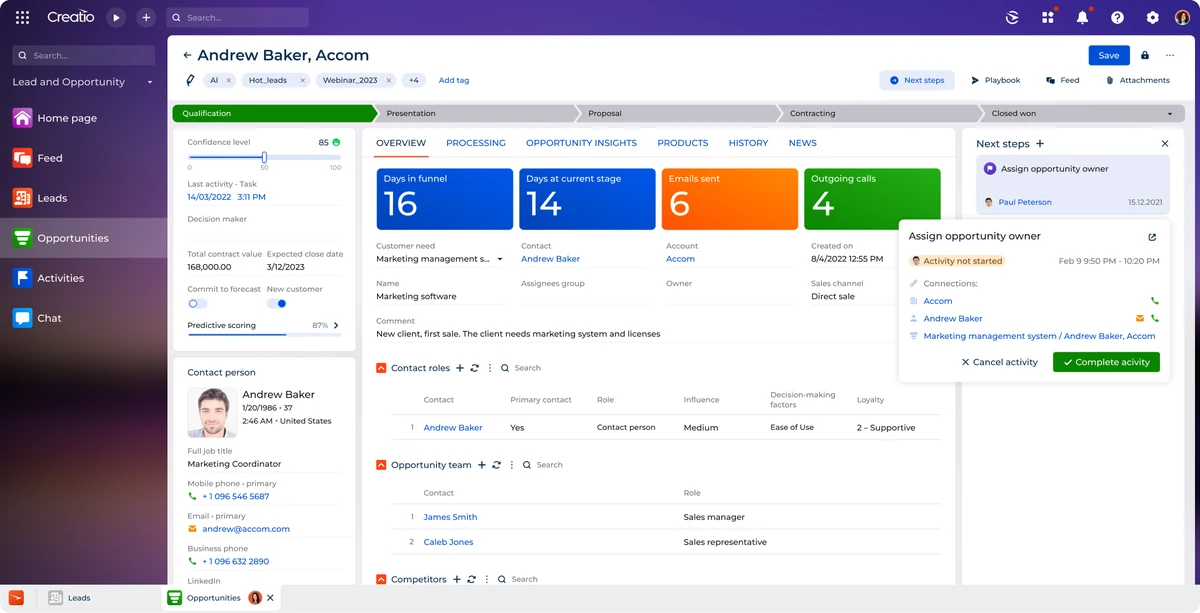
CRM (Customer Relationship Management) software is a centralized digital tool that businesses use to organize, track, and manage all interactions with prospective and existing customers. At its core, the platform replaces scattered spreadsheets and message threads with a shared database that records contact information, sales deals, and support requests in real time. This shared system gives sales, marketing, and customer service teams a single source of truth across the entire customer lifecycle.
What Customer Relationship Management Software Is
CRM stands for Customer Relationship Management. At its core, CRM software is a centralized contacts database that manages a company’s interactions and relationships with both current and potential customers. Rather than scattering client files across separate spreadsheets and notes, the software stores contact records, sales opportunities, service tickets, and marketing campaigns in one unified location accessible to all stakeholders.
This setup serves as a single source of truth across sales, marketing, and customer service teams. Because modern cloud CRM platforms run on remote servers, employees access and update customer records from anywhere through a web browser or mobile app without maintaining on-premise hardware.
How CRM Software Helps Businesses Run
CRM software keeps daily operations organized by turning passive contact storage into active business execution. When customer details live across isolated spreadsheets and personal inboxes, teams face data silos, duplicate entries, and dropped communications. A shared CRM prevents these problems directly:
- Preventing dropped communications: Because the database updates in real time, multiple colleagues coordinating with a client can review prior discussions, open support tickets, and signed contracts before reaching out.
- Protecting institutional knowledge: The system retains all prospect communications and pending deals. If a lead salesperson leaves the company, valuable account context remains intact inside the shared database.
- Eliminating duplicate administrative effort: Real-time data synchronization stops employees from entering identical customer records twice or sending repeated outreach to the same prospect.
- Automating routine workflows: Built-in workflow rules handle administrative tasks such as scheduling task reminders and assigning incoming leads, shifting staff time from manual data entry to client engagement.
- Lowering operational costs: Automating everyday customer management delivers clear efficiency gains, helping small businesses reduce operational costs by 30% while lifting customer retention by up to 15%.
Daily Walkthrough of CRM Software in Action
A typical workday shows how CRM software coordinates customer interactions automatically. Rather than relying on memory or separate to-do lists, team members use connected workflows as deals progress:
- Automatic email capture: When an inbound prospect emails the sales department, corporate email integration automatically creates a new contact profile and logs the entire message thread without manual data entry.
- Visual pipeline updates: A representative drags the deal card across a visual pipeline board from “proposal sent” to “negotiating.” This stage change immediately triggers an automated notification alerting colleagues to prepare contract terms.
- Conditional follow-up nudges: If an electronic proposal sits unopened for three days, pre-set conditional workflow rules flag the account. They also schedule a reminder task for the account manager to check in.
- Mobile field logging: A sales representative visiting a client pulls up the account history through a mobile CRM app on-site and reviews past discussions. They log meeting outcomes directly into the database before leaving.
By pairing live records with preset rules, the system ensures that routine follow-ups, onboarding steps, and client handoffs happen without team members needing to manually trigger every action.