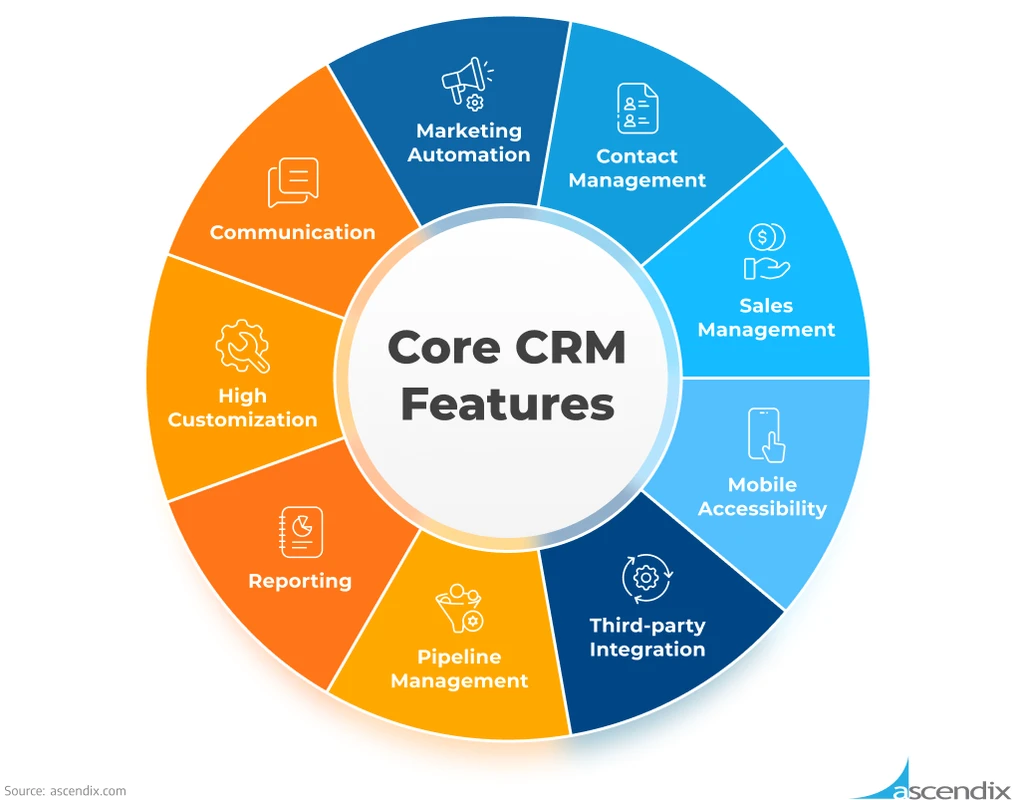
Contact and account management gives a centralized single source of truth for organizations tracking customer interactions. Pipeline and opportunity tracking serves sales reps managing multi-stage deals, and workflow automation suits teams looking to eliminate repetitive administrative tasks. Together with customizable reporting dashboards, these core capabilities combine data, automated processes, and analytics to give businesses a complete 360-degree customer view across every interaction.
Essential Core Features of a CRM System
Contact and Account Management
Contact and account management creates a searchable database that acts as a company’s single source of truth. As cataloged by Creatio, consolidating customer communication histories, profiles, and purchase details gives teams a 360-degree customer view across all interactions.
Accumulating large volumes of customer contact records fails to deliver value if teams lack defined reporting structures to extract and use the information. Storing thousands of profiles without organization creates administrative clutter rather than sales opportunities.
- Searchable registries with consolidated communication logs
- Activity timelines tracking emails, calls, and meetings
- Custom fields for account hierarchies and business attributes
Pipeline and Opportunity Tracking
Pipeline and opportunity tracking comes with visual deal stages to monitor sales cycles. Small sales teams prioritize visual pipeline tracking to monitor opportunity health and manage daily sales tasks.
Basic opportunity tracking lacks the multi-tier approval workflows and governance controls required by enterprise and regulated organizations. When transactions require legal review or discount authorizations, entry-level pipeline boards fail to enforce compliance.
Rule-Based Workflow Automation
Rule-based workflow automation removes repetitive administrative chores by executing pre-set actions when specific conditions occur. Setting up condition-based triggers automates standard processes:
- Automated email responses sent when a prospect submits a web form
- Instant task assignments routed to reps when deal stages change
- Record status updates based on customer milestones
- Approval routing triggered when quotes exceed standard discount limits
Static condition-action rules cannot process unstructured data or handle adaptive reasoning without advanced artificial intelligence. They follow fixed paths and fail when inquiries fall outside predefined parameters.
Reporting and Analytics Dashboards
Reporting and analytics dashboards present business metrics through visual charts and summary tables. Customizable interfaces give visibility into sales trends, customer behavior, win rates, and individual rep performance.
Tomorrow’s Office warns that evaluating reporting features using generic checkbox criteria leads to vanity reporting. Teams struggle to extract value unless they specify exact operational questions beforehand, such as pipeline by stage, forecast versus quota, win rates, and lead source performance.
Advanced Capabilities in Modern CRM Platforms
Predictive Analytics and Autonomous AI Agents
Predictive analytics and autonomous AI agents automate complex customer engagements. Salesforce documents that modern platforms deploy no-code conversational prompts to trigger autonomous digital agents that execute multi-step workflows, generate intelligent content, and forecast operational trends.
Autonomous agents and predictive models produce unreliable output when deployed without clean CRM data foundations, business rules, and permission guardrails. AI models cannot deliver dependable enterprise results if underlying records contain duplicate or unverified data.
- Conversational prompts that direct autonomous agents through routine workflows
- Predictive lead scoring based on historical conversion attributes
- Automated content drafting for personalized customer outreach
No-Code Process Customization
No-code process customization allows non-technical teams to modify interfaces, data fields, and automated workflows independently. Creatio emphasizes that no-code tools let departmental managers adjust layouts and operational rules without programming or heavy IT intervention.
Organizations face ongoing administrative bottlenecks when choosing complex platforms that require continuous external vendor support for routine updates, especially when internal teams expected self-management.
Centralized Document Management
Centralized document management integrates contract, quote, and invoice creation directly inside CRM customer records. Native document tools pull verified account data straight into templates to maintain transactional accuracy.
Document generation tools require direct integration with back-office inventory, order processing, and accounting systems to prevent operational silos. True transactional accuracy requires CRM documents to connect with ERP and billing software.
- Direct template population for quotes, contracts, and proposals
- Native invoice generation from finalized deal records
- Shared repositories for version-controlled customer agreements
Departmental CRM Requirements for Sales, Marketing, and Support
Sales Team Core Requirements
Sales teams rely on features that accelerate deal movement and remove manual tracking. Guidance from Tomorrow’s Office identifies essential sales requirements:
- Lead capture and automated routing to assign prospects by territory or rep availability
- Visual opportunity tracking with customizable sales stages
- Sales sequences and automated email follow-up schedules
- Integrated meeting scheduling tools and activity tracking
- Quota forecasting, territory management, and quote generation
Marketing Team Core Requirements
Marketing teams require tools that attract prospects, track campaigns, and nurture leads toward sales readiness. Tomorrow’s Office outlines primary marketing requirements:
- Granular audience segmentation based on demographic and behavioral data
- Web lead capture forms integrated directly with CRM records
- Automated lead scoring to qualify prospect purchase intent
- Multi-channel campaign tracking and automated email marketing
- Lifecycle stage tracking and revenue attribution tied to sales pipeline metrics
Customer Support Core Requirements
Customer support teams focus on resolving customer inquiries across service channels. Service teams depend on specific operational capabilities:
- Centralized case management to log, prioritize, and track support tickets
- Omnichannel communication routing across email, phone, and web chat
- Customer self-service knowledge bases and automated chatbots
- AI-assisted case resolution suggesting answers to service agents
- Field service scheduling, mobile access, and service history tracking as outlined by Salesforce
Must-Have vs. Nice-to-Have Departmental Decision Guide
A departmental decision guide maps core versus advanced capabilities directly to specific team workflows to separate must-have operational requirements from nice-to-have features. For sales workflows, essential must-have capabilities include contact and account management, visual opportunity tracking across custom sales stages, and automated lead routing by territory or rep availability. Meanwhile, advanced sales capabilities such as automated sales sequences, quota forecasting, territory management, and autonomous AI agents represent nice-to-have additions that organizations can layer on as deal volume expands.
For marketing workflows, audience segmentation, web lead capture forms, and email campaign automation serve as operational must-haves to maintain prospect engagement, while automated lead scoring, lifecycle tracking, and revenue attribution represent advanced nice-to-have capabilities. In customer support workflows, service-heavy teams require centralized case management and omnichannel communication across email, phone, and web chat as foundational must-haves. Customer self-service knowledge bases, automated chatbots, and AI-assisted case resolution work as advanced nice-to-haves. Following evaluation guidance from Tomorrow’s Office, categorizing requirements across these departmental workflows before engaging vendors prevents optional features from overshadowing essential operational needs.