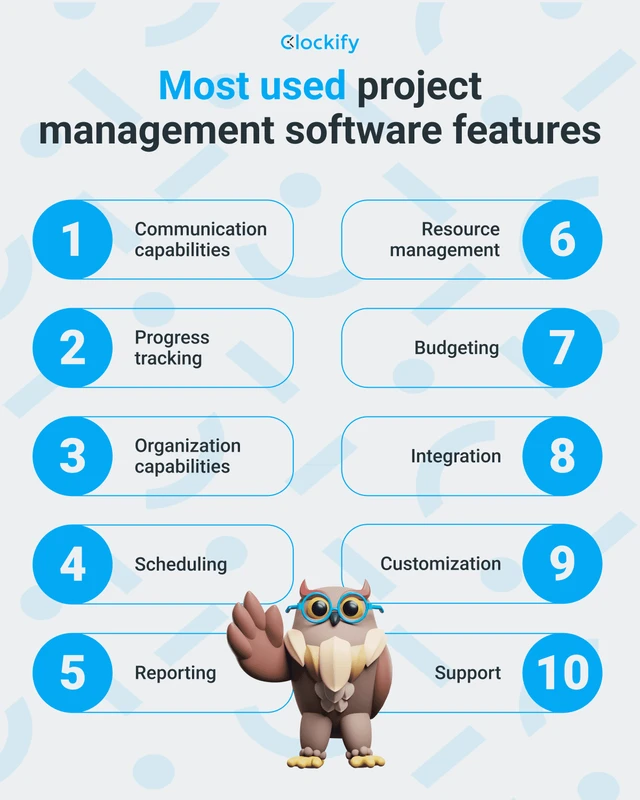
Task assignment and dependency tracking, multi-format visualization views, and workload capacity balancing represent the essential core features of project management software. Task assignment with dependency tracking suits operational teams coordinating sequential deliverables. Multi-format views suit cross-functional departments requiring diverse perspectives on shared project data. Workload balancing suits team leads monitoring individual bandwidth to avoid delivery bottlenecks. Core software packages combine these foundational capabilities with centralized document storage and direct time tracking, establishing an operational baseline before teams evaluate advanced governance and automation layers.
Core Features of Project Management Software
Task Assignment and Dependency Tracking
Task creation, owner assignment, due dates, milestones, and status progressions establish the baseline operational layer of project software. Assigning single owners ensures accountability across deliverables, while milestones mark key progress stages against project scope. Structured status fields trace work from initial creation through to completion.
True dependency tracking on Gantt charts links tasks sequentially and enables constraint-driven rescheduling. Platforms like Smartsheet and Zoho Projects come with a Gantt chart view where teams drag and drop task bars to adjust schedules and establish critical path links. Unlike static timeline bars that serve only visual display purposes, functional dependency logic shifts downstream work automatically when predecessor tasks miss deadlines.
Multi-Format Visualization Views
Multi-format visualization options let team members inspect identical live project data without creating duplicate entries. ClickUp comes with 15 selectable task views, so managers can examine timelines on Gantt charts while individual contributors manage assignments through Kanban boards, calendars, or table lists. To keep these views organized, ClickUp routes work through a hierarchy moving from Spaces down to Folders, Lists, and individual Tasks.
Workload and Capacity Balancing
Workload balancing tools surface real-time individual capacity and task distribution across active assignments. The Asana Workload view, for example, highlights employee bandwidth so team leads can reassign tasks before overload triggers delivery delays. Viewing allocations across roles in real time prevents uneven work distribution across team members.
Native time tracking logs employee hours directly against specific work items rather than through separate external tools. Connecting logged hours straight to tasks gives accurate labor records and keeps project progress tied directly to elapsed effort.
Centralized Document Management
Centralized document management secures project assets in a single location with access permissions and version control. Storing proposals, briefs, and meeting notes directly within work items eliminates the need to hunt for files across random email threads. In Wrike, teams conduct in-task proofing and approvals across 30+ file types, including video and HTML assets, which keeps review feedback attached to the work item itself.
Teams encounter communication overhead when adopting built-in project chat, such as Basecamp Campfire rooms, while already using dedicated messaging tools like Slack or Microsoft Teams. Splitting discussions across platforms scatters important project context. In addition, relying on automated status summaries without verifying underlying task data causes outdated information to circulate across active workstreams.
Advanced Capabilities in Enterprise Project Tools
Multi-Project Portfolio Rollups
Enterprise portfolio rollups consolidate status, risks, and resource utilization across portfolios managing up to 40 concurrent projects simultaneously. Basic task management tools track individual activities but lack cross-project governance. In contrast, dedicated project portfolio management platforms like Celoxis, FlexiProject, Planview, and Workzone integrate native financial governance directly into the platform. These systems feature budget versus actuals tracking, billing and time and material costing, earned value analysis, and what-if scenario modeling to forecast cross-project resource allocations and test schedule changes before applying them.
Project Baseline Comparison
Project baseline tracking captures snapshots of the original project plan to measure schedule variance and budget deviations over time. Tools such as Smartsheet and Zoho Projects allow managers to freeze approved project timelines as reference baselines. As work progresses, the system measures live completion dates against the baseline snapshot. This comparison detects delays early, showing whether active tasks are slipping against planned deadlines and enabling course corrections before milestone dates fail.
Automated Workflow Blueprints
Automated workflow blueprints eliminate manual coordination by triggering status changes, field updates, and task reassignments through preset logic. The Asana Workflow Builder comes with a visual canvas for mapping rules, while tools like Wrike Blueprint and Zoho Projects enforce sequential handoffs across complex processes. Teams capture incoming work through dynamic request intake forms in Wrike, which format internal and external requests directly into structured tasks. In addition, Wrike task cross-tagging allows a single work item to appear across distinct reports without duplicating the parent entry.
At the enterprise tier, software ecosystems connect across 200+ native integrations, as seen in Asana, while offering configurable data residency settings across the EU, US, and APAC regions. Implementing these systems requires restraint: building too many custom fields, triggers, and dashboards introduces high setup and maintenance overhead without improving day-to-day team efficiency.
Feature Requirements for Different Team Workflows
Different operational teams require specific feature sets tailored to how they execute daily work. Evaluating software against team profiles prevents implementation failures caused by capability mismatches:
- PMO and Delivery Teams: Require portfolio rollups, formal governance controls, cross-project resource forecasting, and executive reporting. Mismatch pitfall: Adopting tools that report only at the individual project level blinds leadership to resource constraints and schedule risks across concurrent initiatives.
- Agile and Product Teams: Require interactive sprint boards, backlog management, and sprint velocity tracking. The Jira Velocity report, for instance, calculates completed work across recent sprints to forecast upcoming iteration capacity. Mismatch pitfall: Forcing product teams into rigid waterfall scheduling tools like Microsoft Project restricts backlog flexibility and slows sprint cadence.
- Technical and Engineering Teams: Require code repository connections, automated developer pipeline integrations, issue dependency mapping, and open API access. Mismatch pitfall: Selecting platforms that lack developer integrations forces technical teams into manual status updating, weakening alignment between code releases and task tracking.
- Operations and Small Teams: Require rapid setup, minimal training overhead, simple administrative controls, and flat pricing. Mismatch pitfall: Saddling operational groups with complex enterprise portfolio software introduces excessive configuration overhead; similarly, deploying developer-focused platforms like Jira to non-technical business users creates confusing workflows that stall adoption.