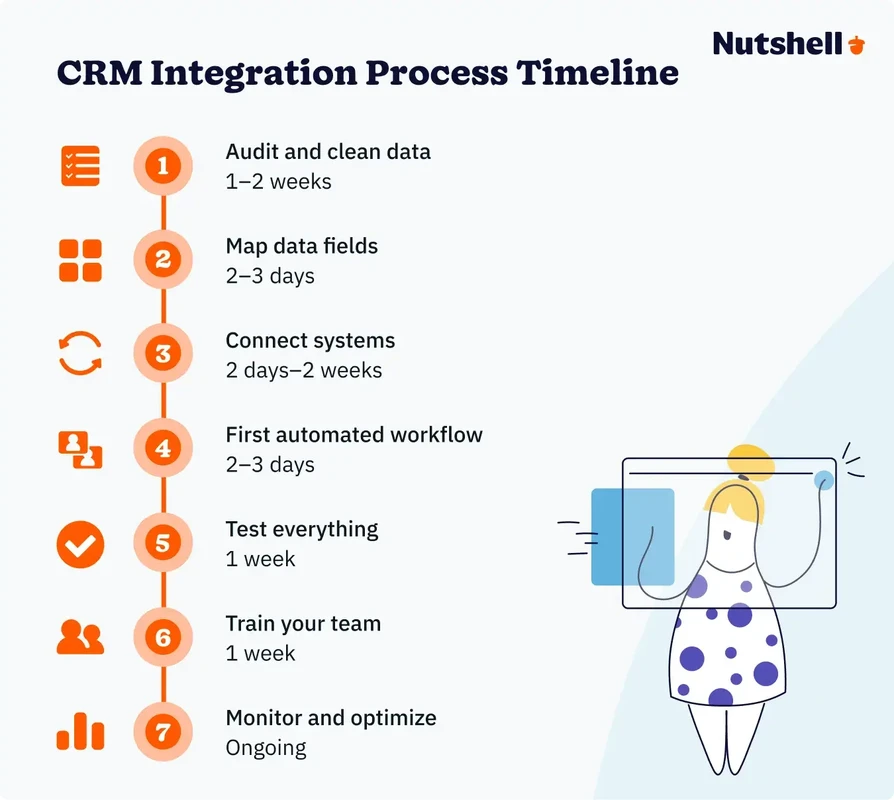
A CRM email marketing integration links customer relationship management software with an email marketing platform to establish continuous, bidirectional data synchronization between sales records and campaign operations. This connection pushes contact details, account ownership, and pipeline stages from the CRM to drive targeted email segments, while logging email opens, clicks, replies, and real-time unsubscribes back onto individual CRM contact activity timelines.
What a CRM email marketing integration does
A CRM email marketing integration links customer relationship software with marketing automation tools to exchange customer data across departments. Salesforce defines an email marketing CRM as the integration of a CRM system with email marketing functionalities to manage customer interactions and automate email campaigns. As Nutshell outlines, when configured correctly, contact data flows from the CRM into the email platform, while engagement data such as opens, clicks, and replies flows back to individual contact records.
Automating data transfers between systems eliminates manual data entry and saves operational time for sales and marketing teams. RevPartners notes that integration creates a steady flow of customer data between systems, removing the need for manual CSV uploads. Direct synchronization prevents record discrepancies and ensures sales reps see how leads interact with marketing content.
This bidirectional sync also enables revenue attribution. Zoho CRM notes that two-way synchronization brings contact and campaign data into a shared area, so teams can cross-reference pipeline deals against specific marketing campaigns to confirm which programs generate revenue.
Data fields synced between CRM and email platforms
Data synchronization between a CRM and an email marketing platform balances outbound campaign targeting with incoming behavioral signals. The CRM acts as the primary master record for identity and sales milestones, while email software governs consent and delivery metrics.
A standard field mapping structure includes four core categories:
- Contact identity and ownership: Names, business email addresses, geographic regions, and assigned account owners sync from the CRM to the email platform to ensure messages route to the right segments from the proper sales representative.
- Pipeline and deal status: Deal stage, close status, and customer status flow from the CRM to marketing automation to trigger targeted nurture tracks or expansion campaigns.
- Consent and compliance: Opt-in records, unsubscribes, spam complaints, and hard bounces originate in email tools and web forms to update the CRM immediately, ensuring suppression lists remain current.
- Engagement telemetry: Message delivery events, opens, link clicks, and direct email replies sync back from the email platform to individual contact records, giving sales reps context on buyer interest.
Teams configure synchronization by establishing control fields first—governing consent in real time alongside lifecycle stage and ownership—before synchronizing secondary engagement scores.
How data flows between systems during active campaigns
During active campaigns, data flows through bidirectional pipelines governed by clear record authority. The CRM remains the master record for contact ownership and lifecycle stages to prevent marketing automation from overwriting funnel stages, while the email platform dictates compliance signals.
In practice, campaign data moves through five operational steps:
- Audience segmentation: Email platforms pull pipeline stages and attributes from the CRM. In Zoho CRM, teams use pipeline data to segment mailing lists into targeted groups like prospects and leads.
- Automated campaign enrollment: Updating a CRM field triggers an email workflow. In OnePageCRM, changing the Contact Status field from Prospect to Nurture automatically enrolls the contact into a pre-built Mailchimp drip sequence.
- Timeline logging: Campaign interactions write directly to the CRM. HubSpot records email sends, opens, clicks, and page visits directly on the CRM contact timeline, while OnePageCRM uses a Mailchimp Widget to display sent campaigns beside direct inbox activity.
- Attribution tagging: Zoho CRM tags lead and contact records with specific campaign interactions and timestamps, so reps can inspect marketing engagement before outreach.
- Divergent synchronization intervals: Unsubscribe and spam complaint data must synchronize to the CRM in real time to maintain legal compliance and prevent improper sends. Routine engagement metrics, such as opens and clicks, synchronize multiple times daily.
Connection methods for linking CRM and email software
Built-in all-in-one platforms
All-in-one platforms combine CRM and email marketing within a single shared database. Solutions like Nutshell eliminate external sync configuration, data monitoring, and separate billing. Most small businesses complete setup in 2 to 4 weeks. Operating on one database prevents synchronization delays, though these suites offer simpler automation builders than dedicated marketing platforms.
Direct native connectors
Direct native connectors link a standalone CRM to a specialized email tool through vendor marketplace integrations or custom API builds. Connecting separate platforms requires 4 to 8 weeks of setup, field mapping, and testing. As Knit notes, a native integration gives direct workflow control, but internal teams must build and maintain authentication, field mapping, sync logic, error retries, and API updates. Many native connectors also log engagement only as plain text notes rather than structured activities.
Middleware and unified API bridges
Integration middleware and abstraction layers bridge separate tools without custom endpoint coding. General tools like Zapier connect applications through trigger-action recipes, while Knit offers a unified API that gives a normalized layer across entire software categories. Specialized middleware like OutboundSync connects CRMs such as HubSpot and Salesforce to outbound email tools, writing structured timeline activities and enforcing bidirectional suppression lists.
Practitioners choose between these three connection architectures using three operational criteria:
- Deployment speed: Built-in platforms deploy in 2 to 4 weeks with minimal technical setup. Connecting standalone tools through native connectors or middleware requires 4 to 8 weeks to map fields and validate workflows.
- Maintenance overhead: Built-in tools require zero connector monitoring. Direct native integrations require ongoing developer maintenance for API version changes and error handling, while middleware providers maintain connection stability externally.
- Timeline logging depth: Standard native connectors often record clicks and opens as unstructured notes. Organizations requiring automated sales triggers choose specialized middleware or unified architectures that write structured timeline activities and support bidirectional suppression.