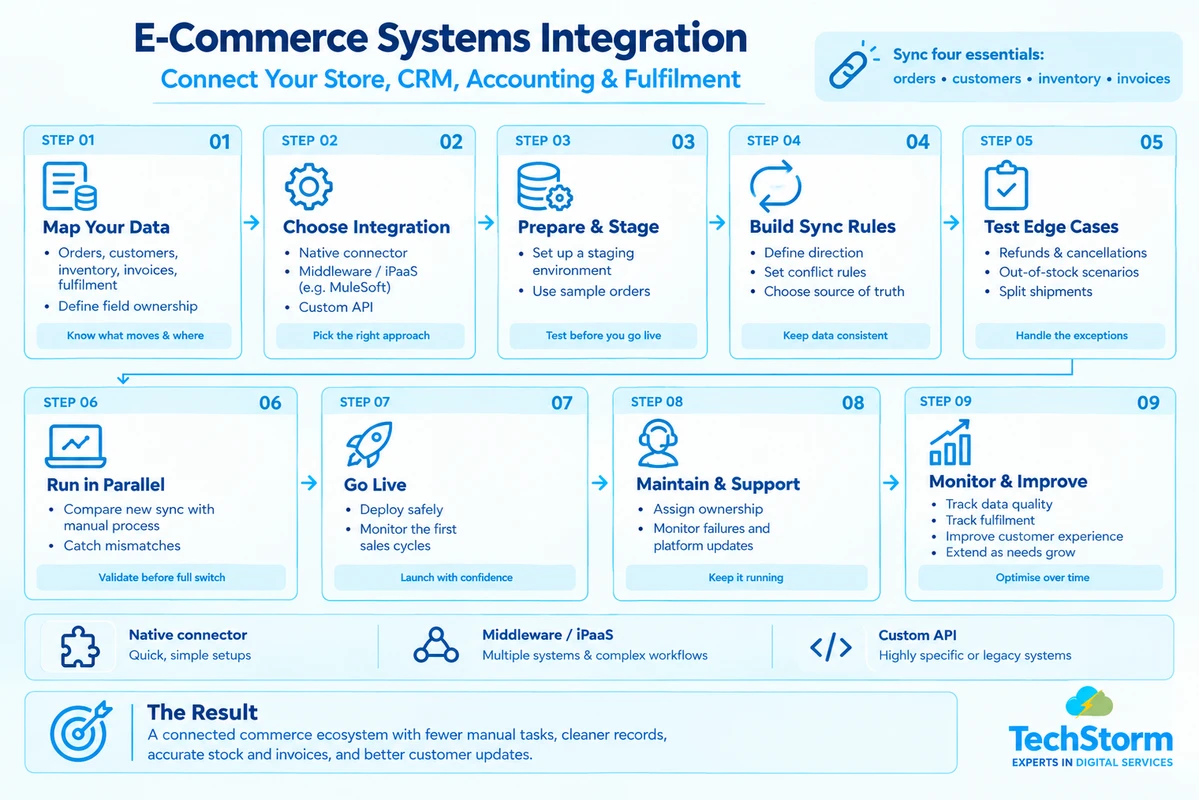
Planning and executing a CRM and ERP integration requires establishing authoritative data ownership, choosing an integration architecture (native connectors, iPaaS middleware, or custom APIs), mapping core transaction objects unidirectionally, and deploying through three-stage validation in 2 to 3 months using platforms like Boomi or Stacksync. Selecting pre-built connectors cuts implementation time by 40% to 60% compared to custom API builds requiring 3 to 6 months, while enforcing OAuth 2.0 security standards. IT teams must deduplicate account schemas upfront and restrict bidirectionally editable fields to prevent data corruption and maintain reliable 1-second sync latency across customer, inventory, and order pipelines.
Planning data ownership and integration architecture
Data ownership must be partitioned so that each application acts as the definitive authority for designated data domains. In an enterprise setting where 26% of employees use an ERP system, setting clear system boundaries prevents cross-platform confusion. Your CRM platform serves as the master record for customer details, contact history, and pipeline opportunities. The ERP platform governs product catalogs, inventory tallies, pricing structures, and order fulfillment. Clear boundary definitions eliminate conflicting records before any data packets traverse network endpoints.
Preparing data schemas before building connections minimizes downstream integration costs. IT teams must audit existing databases to deduplicate accounts, normalize naming conventions, standardize address formats, and archive unused fields. Clean master records reduce transformation complexity inside integration workflows. Teams must also restrict bidirectionally editable fields to the absolute minimum. Shared mutable fields represent the primary point of failure in system integrations, causing synchronization collisions and record corruption when users update both platforms simultaneously.
Technical leads evaluate four primary architectural patterns to connect CRM and ERP environments: point-to-point connections, native connectors, enterprise integration platforms, and custom API layers. Regardless of the architecture selected, teams must standardize API connectivity on OAuth 2.0 authentication protocols. Enforcing OAuth 2.0 ensures secure, token-based communication between systems without exposing permanent administrative credentials in configuration files or integration pipelines.
Evaluating native connectors, iPaaS middleware, and custom APIs
Selecting an integration method requires balancing implementation timelines, ongoing maintenance costs, and schema flexibility. Point-to-point connections create brittle dependencies that break when software vendors update their applications. In contrast, modern integration middleware and pre-built connectors cut development time by 40% to 60% compared to custom solutions, while maintaining 1-second synchronization latency.
A structured comparison reveals how each architecture matches specific enterprise requirements (costs checked November 2026):
- Native Connectors: Built-in connectors, such as HubSpot’s native ERP integrations, come with fast, no-code deployment. They work well when standard data models match operational needs without structural changes. However, they lack schema flexibility and cannot accommodate custom fields or complex routing rules.
- Enterprise iPaaS Middleware: Multi-tenant platforms like Boomi or dedicated synchronization engines like Stacksync deliver 1-second sync latency across multi-system environments. Deployments take 2 to 3 months, with annual subscription costs ranging from $12,000 to $25,000. For simpler trigger-action workflows, visual automation tools such as Make or Zapier can route transactional data. Middleware platforms come with standardized connectors and centralized management, so teams can modify integration logic without rewriting code.
- Custom APIs: Bespoke REST or SOAP development suits legacy ERP platforms with non-standard logic that pre-built connectors cannot process. Custom builds take 3 to 6 months to complete and require over $150,000 in upfront investment. Custom scripts also generate ongoing technical debt, as underlying SaaS version upgrades frequently alter API behaviors and break custom-coded connections.
For organizations connecting standard cloud platforms, iPaaS middleware gives the best operational balance. Investing $12,000 to $25,000 per year avoids the $150,000+ upfront expense of custom development, shortens the project timeline to 2 to 3 months, and insulates internal workflows from vendor platform updates.
Mapping core data objects and synchronization directions
Transactional data objects require unidirectional flows governed by strict system ownership. In a standard quote-to-order workflow, accepted quotes in a CRM such as Salesforce transfer unidirectionally into an ERP system like SAP or Oracle NetSuite as draft orders. The ERP platform then executes automated validation checks covering inventory availability, pricing rules, customer credit standing, and shipping terms before confirming the order. Enforcing unidirectional transmission for orders prevents record locking and eliminates duplicate sales entries.
Customer master data synchronizes through an authoritative handshake. When a prospect converts into a paying customer within the CRM, the integration pushes validated legal names, VAT IDs, billing addresses, and payment terms to the ERP. The ERP registers the account and returns a unique ERP customer code to the CRM. Storing this ERP customer code within the CRM establishes a shared primary key, ensuring accurate mapping for all future transactions.
Field-level synchronization must enforce explicit overwrite rules rather than full bidirectional replication. The ERP must unconditionally overwrite inventory quantities in the CRM, as the ERP maintains physical inventory ledgers. Conversely, the CRM must overwrite opportunity deal stages in the ERP. Attempting to synchronize every field bidirectionally increases conflict risks, generates record-locking errors, and causes widespread data corruption. Effective integration transfers only necessary data points with defined system owners.
Building, testing, and deploying the integration workflow
Configuring payload validation and workflow pipelines
Building an integration pipeline requires three-stage data validation to safeguard data integrity across endpoints. Stage one verifies payload formatting, character encoding, and required fields prior to data transmission. Stage two detects transfer errors in-flight, catching connection drops or rejected requests. Stage three verifies field-mapping fidelity post-transfer to confirm that destination records match source values. Resolving field mismatches and schema discrepancies early during initial data mapping, as demonstrated during the Heraeus Medevio integration, prevents downstream data loss and costly rework during production runs.
Executing sandbox boundary tests and timeout verifications
Before promoting code to production, technical teams must perform boundary integration testing in isolated sandbox environments. Test scenarios require explicit pass/fail criteria and payload contracts to verify data handling under extreme parameters. Teams must verify that automated fulfillment triggers execute within the standard 60-second timeout threshold. Confirming that data pipelines process transactions within 60 seconds ensures that system bottlenecks, payload serialization delays, and slow API endpoints are identified before business operations rely on the connection.
Managing cutover, regression checks, and error monitoring
Deploying to production requires coordinated cutover plans, regression suites, and automated error tracking. When deploying updates or defect fixes to CRM integration logic, teams must run regression tests across all integrations sharing the middleware infrastructure. Skipping regression testing can cause CRM modifications to inadvertently disrupt unrelated services, such as automated bank feeds. IT teams must also configure automated error queues and dead-letter alerting before launch. Without dead-letter alerts and clear recovery procedures, silent synchronization errors accumulate undetected until month-end financial reconciliations uncover corrupted accounts.