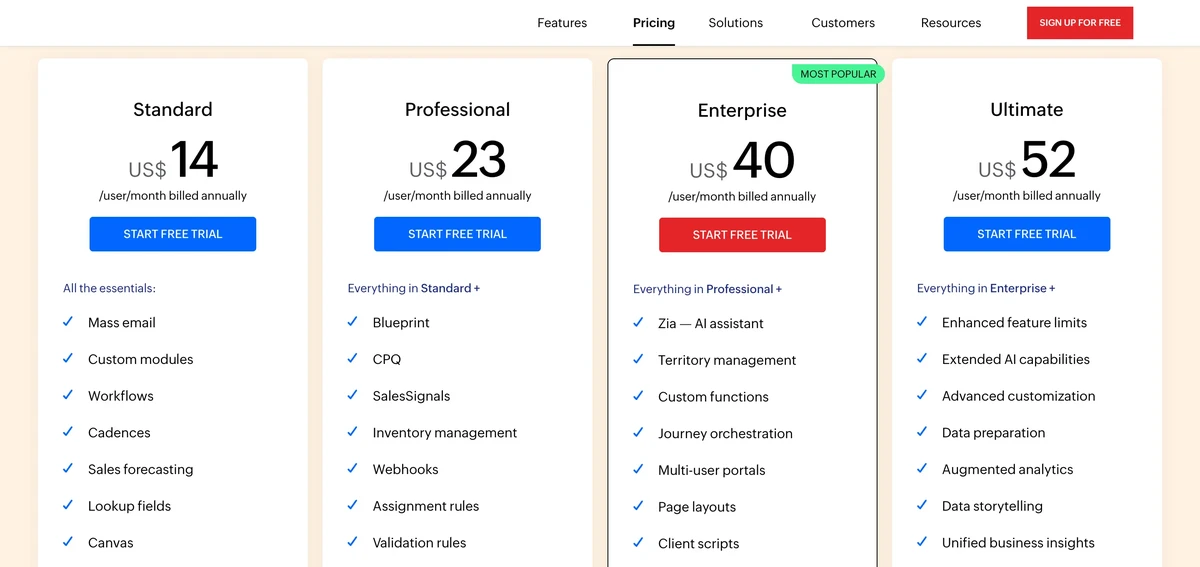
Zoho CRM pricing in 2026 operates on a per-user, per-month subscription model structured across five core tiers: Free ($0 for up to 3 users), Standard ($14/user/month billed annually), Professional ($23/user/month), Enterprise ($40/user/month), and Ultimate ($52/user/month). While base seat costs remain significantly lower than enterprise competitors, organizations must account for a 20% to 34% surcharge on month-to-month contracts and supplementary expenses for storage and integrations that frequently increase base licensing costs.
According to G2 data, Zoho CRM pricing in 2026 starts at $14.00 and can reach $52.00 depending on the selected plan and billing terms. Evaluation platforms record widespread adoption, reflecting ratings of 4.3 out of 5 stars on Capterra and 4.1 out of 5 stars on G2. Determining the true financial commitment requires looking past the base seat price tag to evaluate functional cutoffs, database storage limitations, automated workflow caps, and technical onboarding resources.
Zoho CRM 2026 Pricing Plans at a Glance
In 2026, Zoho CRM pricing ranges from $0 to $52 per user per month billed annually ($20 to $65 billed monthly). The lineup includes Free (up to 3 users), Standard ($14/user/month), Professional ($23/user/month), Enterprise ($40/user/month), and Ultimate ($52/user/month), alongside Bigin for micro-teams at $7 per user monthly.
Selecting an edition requires balancing user seat counts with functional requirements such as automated pipeline management, workflow triggers, and custom data architecture. The baseline pricing schedule across all commercial editions reflects distinct operational capabilities:
Edition Tier |
Annual Rate (Per User/Mo) |
Monthly Rate (Per User/Mo) |
Included Storage |
Primary Capabilities and Differentiators |
|---|---|---|---|---|
Bigin by Zoho |
$7 |
$9 |
1 GB total shared |
Pipeline-only tracking for micro-teams, basic telephony, contact history |
Free |
$0 |
$0 |
10 MB |
Up to 3 users, basic contact and lead records, mobile app access |
Standard |
$14 |
$20 |
200 MB |
250 mass emails/day, custom dashboards, multiple pipelines, basic workflows |
Professional |
$23 |
$35 |
10 GB |
Blueprint process automation, inventory and quotes, webhooks, Google Ads sync |
Enterprise |
$40 |
$50 |
10 GB + org pool |
Zia AI, custom modules, sandboxes, territory management, HIPAA compliance |
Ultimate |
$52 |
$65 |
100 MB/user + dedicated |
Bundled Zoho Analytics, 2,000 mass emails/day, dedicated database infrastructure |
For organizations evaluating functionality before signing a contract, Zoho provides a 15-day free trial on the Standard, Professional, Enterprise, and Ultimate plans without requiring payment card information upfront. Micro-businesses with three or fewer team members can begin on the permanent Free plan, while growing ventures requiring lightweight pipeline management without enterprise complexity can enter through Bigin at $7 per user monthly.
Core Tier Breakdown and Feature Differences
Feature distribution across Zoho CRM tiers follows a deliberate architectural model, moving from basic data recording to automated execution and artificial intelligence. Knowing where specific tools become available prevents organizations from choosing an edition that stalls their day-to-day operations.
Free and Standard: Essential Contact Management
The Free edition functions as an entry-level digital contact book restricted to a maximum of 3 users and 10 MB of total storage. It includes core records for leads, accounts, contacts, and deals, along with mobile application access and standard reports. However, the Free tier omits automated workflows, mass email delivery, third-party marketplace integrations, and advanced pipeline customization. A sales team cannot set automatic follow-up tasks, parse incoming form data, or synchronize calendar activities reliably without manual intervention.
Upgrading to the Standard tier ($14 per user monthly billed annually) resolves these structural gaps. Standard introduces 200 MB of storage, custom fields, multiple deal pipelines, forecasting metrics, and custom dashboard reporting. It unlocks automated workflow rules, allowing teams to trigger notifications and assign records automatically based on stage changes. Standard also incorporates mass email broadcasting, lead scoring models to rank prospects, and access to the Zoho Marketplace for third-party extensions.
Professional: Sales Process Automation with Blueprint
The Professional edition ($23 per user monthly billed annually) represents the most popular choice among Zoho CRM pricing tiers, serving as the practical threshold for scaling commercial sales teams. Its definitive operational feature is Blueprint, an execution builder that enforces structured stages across deal execution. Blueprint mandates specific data inputs, checklist completions, and administrative approvals before a representative can advance an opportunity to the next pipeline stage. This eliminates missing qualification criteria and abandoned deals.
Professional expands functional scope by incorporating complete quote, sales order, invoice, and inventory tracking directly inside the CRM. Sales reps can generate customer-facing documentation without opening separate financial software. It also introduces digital advertising campaign attribution to track cost-per-lead directly against closed revenue, alongside custom buttons and webhooks that send real-time data payloads to external web services when records update.
Enterprise and Ultimate: Zia AI and Advanced BI Capabilities
The Enterprise plan ($40 per user monthly billed annually) targets mid-sized organizations with specialized operational pipelines and complex compliance obligations. Enterprise introduces Zia, Zoho’s artificial intelligence assistant. Zia analyzes sales behavior, calculates deal win probabilities, detects anomalies in revenue trends, and recommends the best time of day to contact specific leads. Enterprise also includes CommandCenter, which maps and monitors multi-channel customer journeys across different teams in real time.
Beyond predictive tooling, Enterprise unlocks custom modules, enabling administrators to build relational databases inside the CRM for tracking company-specific data entities like equipment leases or clinical records. It includes deployment sandboxes for testing Deluge automation scripts before pushing updates to production, territory management rules for splitting accounts across geographic teams, and technical configurations supporting HIPAA compliance for healthcare operations. Ultimate ($52 per user monthly billed annually) builds on Enterprise by bundling Zoho Analytics for deep business intelligence reporting, expanding daily mass email limits, and providing dedicated infrastructure limits for high-volume transactions.
Annual vs. Monthly Billing: The 20% to 34% Premium
Zoho CRM offers annual and monthly billing across all paid plans, but choosing monthly payments incurs a 20% to 34% price premium. For example, Standard costs $14 billed annually versus $20 monthly, while Enterprise rises from $40 to $50 monthly. Annual contracts maximize cost efficiency, while monthly subscriptions preserve short-term flexibility.
Committing to month-to-month flexibility introduces significant cost accumulation across all paid editions, saving approximately 20% to 34% when choosing annual billing instead:
- Standard Edition: $14 per user monthly billed annually versus $20 billed monthly.
- Professional Edition: $23 per user monthly billed annually versus $35 billed monthly.
- Enterprise Edition: $40 per user monthly billed annually versus $50 billed monthly.
- Ultimate Edition: $52 per user monthly billed annually versus $65 billed monthly.
- Standard Edition: $14 per user monthly billed annually versus $20 billed monthly, representing an additional monthly surcharge.
- Professional Edition: $23 per user monthly billed annually versus $35 billed monthly, representing an additional monthly surcharge.
- Enterprise Edition: $40 per user monthly billed annually versus $50 billed monthly, representing an additional monthly surcharge.
- Ultimate Edition: $52 per user monthly billed annually versus $65 billed monthly, representing an additional monthly surcharge.
Choosing month-to-month billing on the Professional plan costs $35 per user monthly compared to $23 per user monthly on an annual contract. Across all editions, committing to month-to-month billing results in paying a 20% to 34% premium without adding any extra features or storage capacity.
Paying this premium makes financial sense only in specific situations. Companies onboarding temporary contract personnel for short campaigns avoid paying unneeded annual fees by using monthly billing. Similarly, teams running a pilot to test real-world workflow adoption should choose monthly billing before committing capital to an annual agreement.
Hidden Total Cost of Ownership and Add-On Pitfalls
A frequent mistake in software procurement is assuming that the published per-seat license price represents the total project budget. In real-world deployments, supplementary fees, administrative demands, and system requirements increase the actual investment well beyond the base subscription.
Cost Warning: Storage overage fees, integration bridge services, and operational adoption consulting routinely add supplementary expenses to base licensing costs. Calculating budgets strictly from baseline seat prices leads to unexpected budget overruns once real-world data pipelines go live.
Software implementation specialist Code Stringers highlights this budgeting hazard:
The trap isn’t the editions — it’s treating the per-user price as the budget. The real number includes the add-ons you’ll switch on and the implementation, migration, and adoption work that turns a license into a system people actually use.
Data storage caps represent one of the fastest ways unexpected fees accumulate. The Free tier includes only 10 MB of storage, Standard provides 200 MB, and Professional provides 10 GB. While 10 GB accommodates millions of plain text rows, customer attachments, signed PDF agreements, email threads, and marketing collateral consume file capacity rapidly. Exceeding default allowances requires purchasing supplementary data storage packs. For document-heavy operations, storage add-ons alone can add hundreds of dollars to monthly invoices.
API and webhook governor limits present another hidden technical threshold. Standard and Professional tiers enforce strict daily limits on API calls per user and per organization. When an organization synchronizes its CRM with external e-commerce platforms, customer support ticketing software, and corporate accounting databases, high-volume data exchanges can exhaust daily API call limits by early afternoon. To avoid system blackouts, organizations are often forced to upgrade to Enterprise or Ultimate well before they need the advanced features of those higher tiers, purely to secure higher API limits.
Platform complexity poses an equally severe risk to total cost. Capterra software reviewer Mario describes the operational friction of unguided setup:
The biggest advantage is the biggest disadvantage: there are SO many possibilities that you’re initially overwhelmed if you don’t proceed step by step, preferably with support. Otherwise, the (brilliant) mountain of possible settings and configurations is so large that it overwhelms you and you don’t even start.
Customizing business logic requires writing code in Deluge, Zoho’s proprietary scripting language. When built-in drag-and-drop workflows fall short of complex operational needs, companies must invest in technical support and consulting for implementation and adoption. Add-ons for integrations, storage, and support can increase base subscription costs significantly, while strict cancellation terms prevent prorated refunds when reducing seat counts mid-contract.
How to Choose the Right Zoho CRM Tier for Your Team
Selecting the ideal tier requires matching your team’s size, operational complexity, and technical maturity to the features of each plan. When system design and internal adoption align, industry research tracks a benchmark return of $8.71 per dollar invested in CRM infrastructure.
Micro-Teams and Solopreneurs: Choosing Bigin vs. Standard
Single operators and teams of up to 3 people should evaluate Bigin by Zoho ($7 per user monthly) before buying standard CRM editions. Bigin offers a clean, pipeline-focused interface built for managing contacts, scheduling appointments, and moving deals through pipeline stages without complex database configuration. It avoids the administrative burden of role hierarchies, field permissions, and custom modules.
Teams should choose Standard ($14 per user monthly billed annually) only when their workflows require more than simple pipeline tracking. Standard becomes necessary when a company needs multiple sales pipelines for different services, daily mass email broadcasts, rule-based task triggers, and lead scoring models to filter incoming web leads.
Scaling Sales Teams: Maximizing ROI on Professional
Growing commercial sales teams generate the highest return on investment on the Professional plan ($23 per user monthly billed annually). At this stage, enforcing a consistent sales process matters more than raw feature count. The main reason to upgrade from Standard to Professional is Blueprint.
Blueprint eliminates skipped stages in the sales process by requiring representatives to log specific details, such as gathering competitor information or confirming budget approval, before advancing an opportunity. The upgrade to Professional is justified when a company requires:
- Mandatory sales process compliance to prevent reps from moving deals prematurely.
- Integrated product catalogs, formal quotes, and sales order creation within deal records.
- Outbound webhooks connecting the CRM to external payment processors and communication tools.
- Direct digital advertising conversion tracking to measure marketing return on spend against won deals.
Complex Operations: Enterprise vs. Zoho CRM Plus Bundling
Moving from Professional ($23 per user monthly billed annually) to Enterprise ($40 per user monthly billed annually) represents a significant price increase per seat. This upgrade should be driven by concrete structural needs rather than curiosity about artificial intelligence. Before upgrading for Zia AI, organizations should confirm they have sufficient historical data and consistent sales habits to generate reliable forecasts. Without clean operational data, Zia cannot deliver meaningful predictions.
The upgrade to Enterprise is operationally necessary when an organization requires isolated sandboxes to test Deluge automation code, HIPAA compliance safeguards for sensitive customer data, territory management tools to route leads across regional sales divisions, or custom modules to build unique database tables.
Organizations considering Enterprise seats for their entire workforce should also evaluate Zoho CRM Plus. Priced as an all-in-one customer experience platform, Zoho CRM Plus bundles full Enterprise CRM capabilities with dedicated applications for helpdesk ticketing, marketing automation, social media management, website visitor tracking, and advanced business intelligence analytics. When sales teams work closely with customer support and marketing operations, licensing the CRM Plus suite provides broader application access than buying standalone CRM seats alongside separate point solutions.
FAQ
Is there a completely free version of Zoho CRM in 2026?
Yes, Zoho CRM offers a Free plan for up to 3 users with 10 MB of storage space. It provides essential contact management, deal tracking, and mobile access. However, it omits mass emailing, automated workflows, and advanced third-party integrations, making it suitable only for micro-businesses with minimal data volume.
What is the key difference between Zoho CRM Professional and Enterprise?
Professional ($23 per user monthly billed annually) focuses on sales pipeline automation through Blueprint, inventory tracking, and webhooks. Enterprise ($40 per user monthly) adds Zia artificial intelligence, custom modules, sandboxes for staging, territory management, and HIPAA compliance options for regulated industries handling sensitive data.
Does Zoho CRM charge extra for data storage and add-on services?
Yes. Base plans include fixed storage allocations, such as 200 MB on Standard and 10 GB on Professional. When organizations exceed these limits or purchase specialized support contracts and third-party integrations, recurring expenses typically rise by 15% to 40% above the base subscription rate.
When should a business choose Bigin instead of Zoho CRM?
Bigin by Zoho is a streamlined pipeline management tool designed for small teams and micro-businesses, starting at $7 per user monthly. Businesses should select Bigin when they need intuitive deal tracking and contact management without the configuration overhead, administrative governance, or higher cost of full Zoho CRM tiers.